DemoBuilder
Resource Groups and Network
These steps are to be done on an empty subscription preferably.
Resource Groups
You might be messy in real life, its fine, I am messy too, but in Azure organization and clear objectives are key. So, in the Azure Portal, create the following RGs: (you don’t need to create the ones marked with NO today)
Using your OrgName/Domain Name:
| RG Name | Use | Azure Region | Create Today? |
|---|---|---|---|
| OrgName.CoreServers | To Store DCs and other core servers | East 2 | YES |
| OrgName.Servers | For Other servers connected to AD | East 2 | YES |
| OrgName.Networking | For Network stuff, VNet and NSGs for example | East 2 | YES |
| OrgName.Clients | If you ever create client vms, then they go here | East 2 | NO |
| OrgName.DBs | In the future, you might want to have BDs for demos. They go here | East 2 | NO |
| OrgName.Security | Security Stuff here, including Sentinel | East 2 | NO |
| OrgName.Purview | Purview objects in Azure will go here | East 2 | NO |
| OrgName.AnyOther… | In the future, any other should continue the name convention | East 2 | NO |
The benefit of having this setup is simply organization, permissions managements and to show off to customers that you heard from a guy who have been rebuilding labs for as long as Azure exists, that this makes it simpler once its running.
Azure Regions on the RG means not much more than simply a form of templating creation of stuff inside of them. Region is still critical to check when creating stuff
Also, Azure will create some RGs by itself in each region you use, as they are automatic and will recreate nonetheless, so we will ignore them.
Virtual Network
Go to the OrgName.Networking RG and then hit create, and search for Virtual Network: 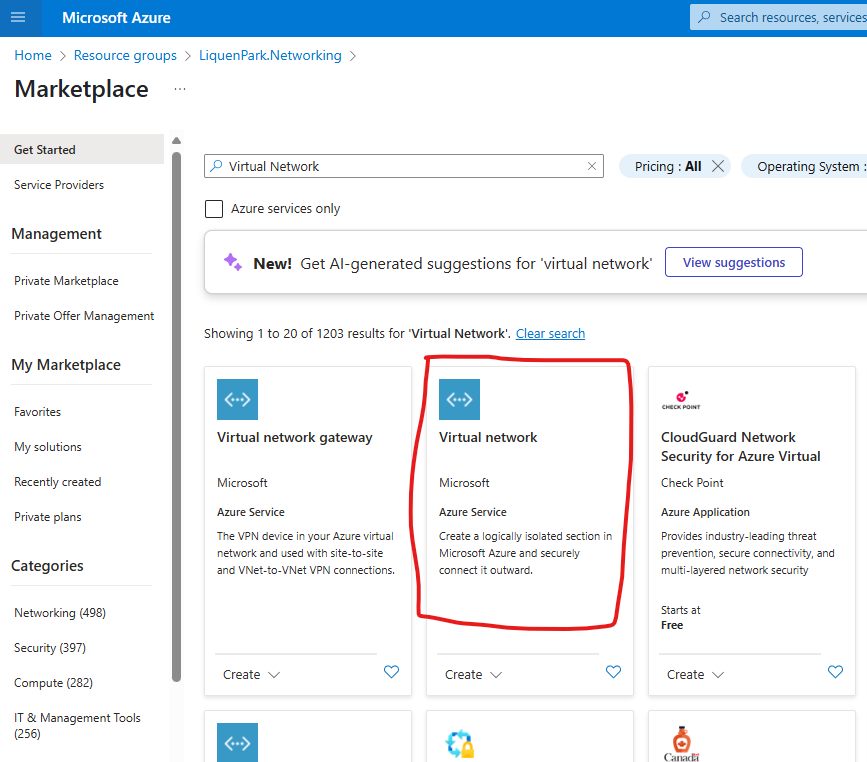 make sure to select Virtual Network and not the Gateway
- Name your Virtual Network something like “LP.VNET”, where LP are the two first letters of my Demo Organization. Click Next
- Disable all the security stuff here. You might want to add them later at cost to your sub
- On the IP Address, delete all the address space, and add the 3 networks we discuss early:
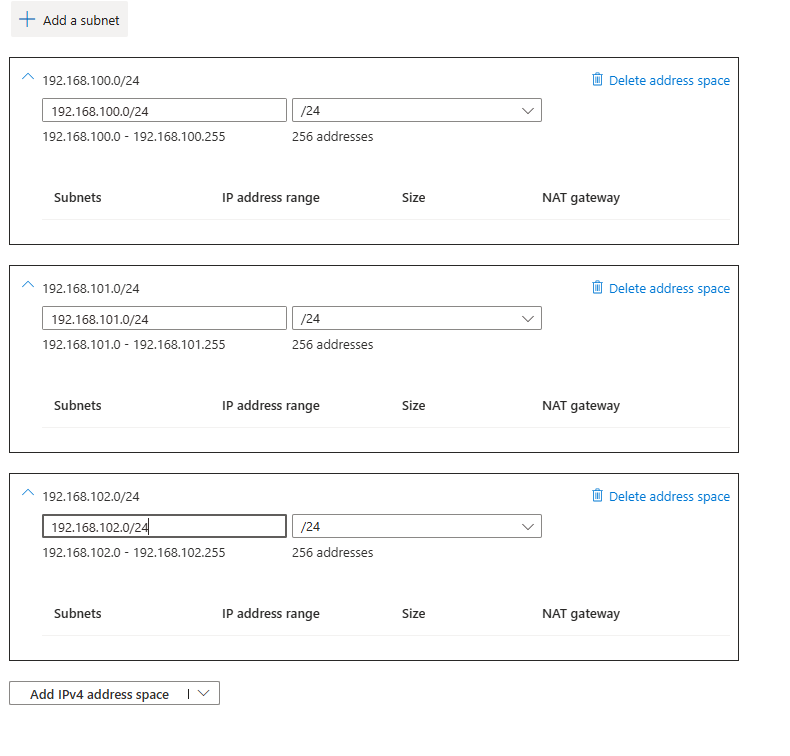
- Tag the network. Name: SolutionArea, Value: Network
- Review and create
- Click Go to Resource or simply go to your Networking RG
- (if you forgot to add the address space, add them now to the address space blade below Settings)
- Click on Settings - Subnets blade
-
Add each of the following subnets, in order (all not noted leave defaults). All with Subnet Purpose “Default”:
Name Range Size R0.CoreServers .100 28 R1.Servers .100 27 R2.Apps .100 26 R3.HybridClients .101 27 R3.Clients .101 27 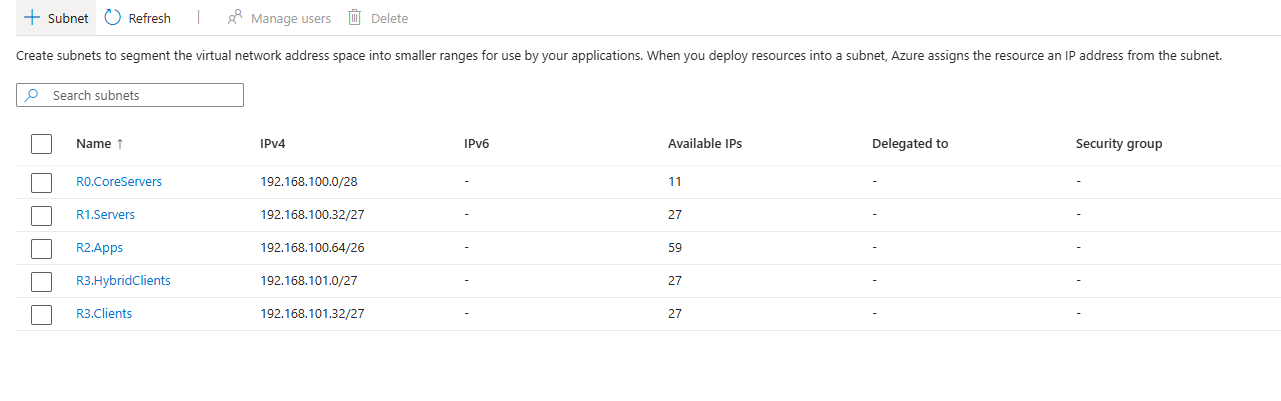 The reason we want to create them in order is so Azure Portal will calculate the starting IP for the next subnet. This is not a subnetting course, took me a while to learn about it, but you can do so too: Subnetting Reference.
Each of these subnets have a reason to exists, even the last network we added (192.168.102.0/24):
- CoreServers for DCs and valuable stuff
- Servers for other servers that can be off and are less important
- Apps might be non-server apps or even server-apps that our hypothetical users could access
- R3 are clients, either hybrid Domain join or not, which are client VMs we don’t necessarily want them to access unrestricted to other stuff
- The last Network, is there if you even want to create a VPN to somewhere, you’ll need a full /24 network available
All of these follows the onion/rings of sensitivity concept. NSGs next will make this more intuitive.
Network Security Group (NSGs)
By default, Azure provides our network with NAT and free traffic flow outwards (towards Internet), and no traffic inwards. But we don’t want defaults in security. In the Networking RG, go and create a Network Security Group.
- Name it something clear, like MotherOfNSG
- Tag it. Name: SolutionArea, Value: Network
- Create it and open it
- By Default the NSG will only allow Subnet to Subnet traffic, and sometimes Internet Out. Let’s verify it. On Settings, Outbound Security Rules blade
- Make sure an AllowInternetOutBound with Port Any, Protocol Any, Source Any, and Destination is Internet is in “ALLOW”
- If not, create the following rule: (or Create it nonetheless. Any Explicit Rule will override implicit or default rules)
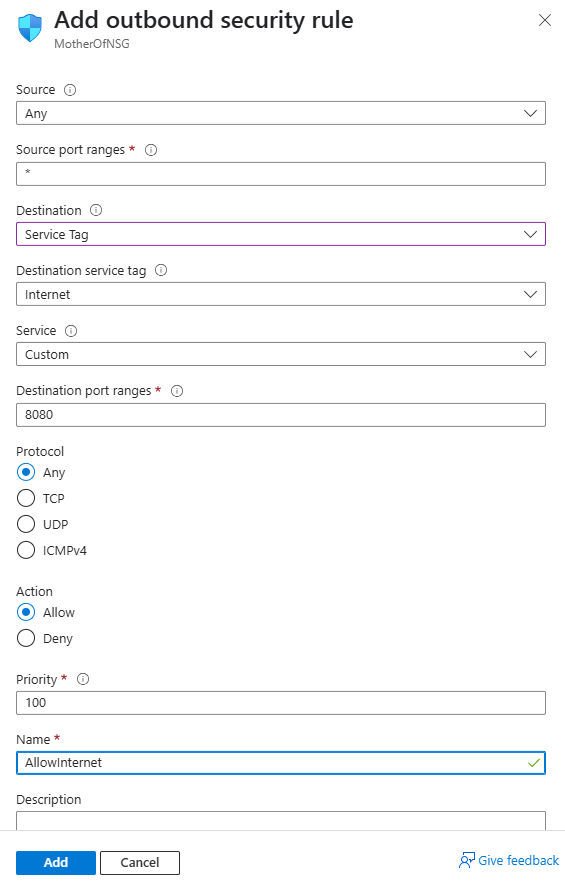
- Priority is important, as the rules are evaluated from lower to higher number
- If not, create the following rule: (or Create it nonetheless. Any Explicit Rule will override implicit or default rules)
- Now we will let our IP connect to RDP into the servers. Remember to remove this rule when finished. Click Inbound Security Rules
- Create a new Inbound Security Rule.
- Source: MY IP Address and verify its correct
- Source Port: *
- Destination: ANY
- Service: Select RDP and 3389/TCP will be auto-selected.
- Action: Allow
- Priority: 100
- Name: leave Default or use “AllowMyIpAddressRDPInbound”
- Create a new Inbound Security Rule.
- Finally, let’s put this NSG to work. Below Settings, click the Subnets blade
- One by one, Associate each of your Subnets (alternatively, you could go one by one to each of the subnet and associate them, which is even slower)
This will use a single NSG, later you should create more and specifically create rules that might restrict more, and even more important, you should never go to sleep with RDP Open towards your network. RDP stands for Ransomware Deployment Protocol just as much as Remote Desktop Protocol.